API integration
Direct integration
This type of integration allows you to increase the amount of a prior authorization (Auth) on your own payment page.
Interaction flow:
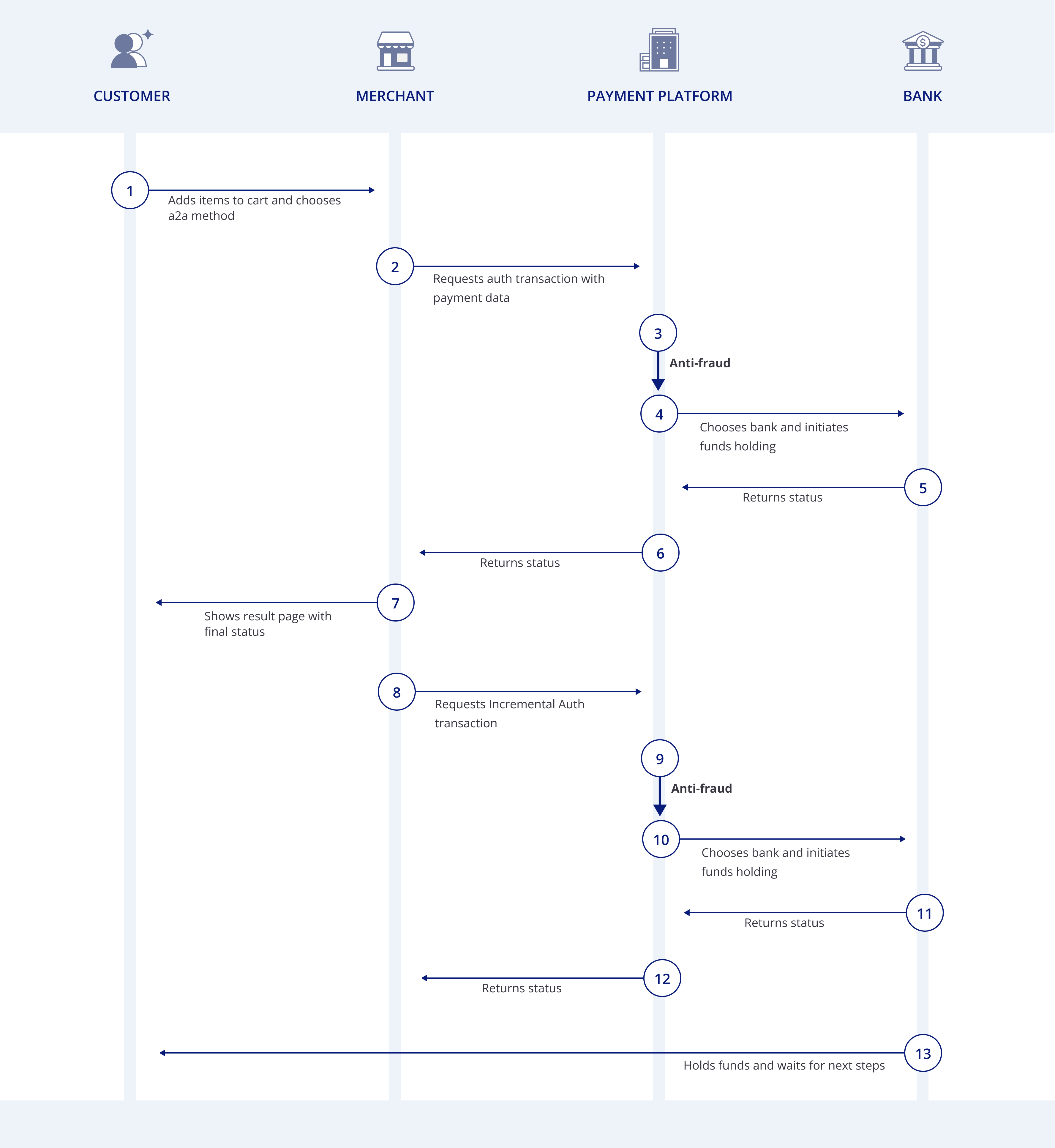
A request for an incremental authorization can only be applied to primary authorization (auth) operations with a successful (success) status. Use the POST HTTP method.
Request parameters:
| Parameter | Type | Required | Description |
|---|---|---|---|
pos_id | UUID | ✅ | Merchant's project identifier |
order_id | String | ✅ | Identifier of the original order (auth) for which the initial authorization was successfully performed |
increment_amount | Number | ✅ | Delta amount by which the current hold should be increased. Passed as a number (e.g., 20.00) |
order_currency | CURRENCY | ✅ | Transaction currency (ISO 4217). Must match the currency of the original hold (auth) |
comment | String | Description of the reason for the increment. Shown in the merchant portal, helps with dispute/chargeback investigation | |
server_url | URL | Webhook notification will be sent to this URL |
Request example:
$ curl --location 'https://api.finline.io/api/v1/auth-increment' \
    -H "Content-Type: application/json" \
    -H "X-API-AUTH: CPAY-HMAC-SHA256 ${API_KEY}:${SIGNATURE}" \
    -X POST -d '{
      "pos_id":            "${POS_ID}",
      "order_id":          "auth-78901",
      "increment_amount":  20.00,
      "order_currency":    "UAH",
      "comment":           "Increasing the hold amount for an additional stop",
      "server_url":        "https://api.merchant.com/webhooks/callback"
    }'
Response parameters:
| Parameter | Type | Description |
|---|---|---|
operation_id | UUID | Unique increment identifier |
payment_id | UUID | payment identifier of primary operation |
order_id | String | Merchant's order_id of primary operation |
transaction_id | UUID | Unique transaction identifier |
pos_id | UUID | Merchant's identifier (POS_ID) |
mode | MODE | direct |
method | METHOD | auth_increment |
amount | Number | Actual increment amount |
currency | CURRENCY | Transaction currency |
status | STATUS | Transaction status |
status_code | STATUS_CODE | payment status code |
status_description | STATUS_DESCRIPTION | payment status code description |
fee | Object | Amount and currency of commission |
comment | String | Increment comment |
created_at | TIMESTAMP | Timestamp when transaction was created |
processed_at | TIMESTAMP | Timestamp when transaction was updated last time |
Response example:
{
  "operation_id":        "edf7605c-99a8-43be-a1a5-2e96ebac8512",
  "payment_id":          "c4939398-1dad-4b92-1c34-7f6802379180",
  "order_id":            "auth-78901",
  "transaction_id":      "4f98dc46-ffff-4ba7-a267-286fe7669894",
  "pos_id":              "6eb070d5-7fbe-1176-9488-c152b60dd346",
  "mode":                "direct",
  "method":              "auth_increment",
  "amount":              20.00,
  "currency":            "UAH",
  "status":              "success",
  "status_code":         "1000",
  "status_description":  "Transaction is successful.",
  "fee":                 null,
  "comment":             "Increasing the hold amount for an additional stop",
  "created_at":          "2018-10-10T10:10:10.100",
  "processed_at":        "2018-10-10T10:10:12.000"
}
Next steps
The testing and going live procedure is the same as for one-step split payments.